Binary search is a widely used algorithm for finding a specific target value within a sorted list or array. It works by repeatedly dividing the search interval in half and eliminating one half of the remaining elements based on whether the target value is greater or less than the middle element. This process continues until the target value is found or the search interval is empty, indicating that the target value is not in the list.
Here’s a step-by-step explanation of how binary search works:
- Start with a sorted list or array: Binary search requires that the input data is sorted in ascending order. This is crucial for the algorithm to work correctly.
- Initialize pointers: Set two pointers, left and right, initially pointing to the first and last elements of the list, respectively. These pointers define the current search interval.
- Calculate the middle index: Compute the middle index as (left + right) / 2. This index corresponds to the middle element of the current search interval.
- Compare the middle element with the target value:
- If the middle element is equal to the target value, you’ve found the desired element, and the search is successful.
- If the middle element is greater than the target value, update the right pointer to be one less than the middle index. This narrows down the search interval to the lower half.
- If the middle element is less than the target value, update the left pointer to be one more than the middle index. This narrows down the search interval to the upper half.
- Repeat steps 3 and 4 until one of the following conditions is met:
- The left pointer becomes greater than the right pointer, indicating that the target value is not in the list. In this case, the search terminates as unsuccessful.
- The middle element is equal to the target value, indicating that the target value has been found. The search terminates as successful.
Example of binary search
let’s illustrate binary search with a simple example using a sorted list of numbers.
Example-1 – Sorted List: [1, 3, 5, 7, 9, 11, 13, 15, 17, 19] Target Value: 13
Here are the steps for performing a binary search:
- Initialize pointers:
- left points to the first element (1).
- right points to the last element (19).
- Calculate the middle index and value:
- Middle index: (left + right) / 2 = (1 + 19) / 2 = 10
- Middle value: list[10] = 11
- Compare the middle element with the target (13):
- 11 (middle element) is less than 13 (target).
- Since the target is greater, update the left pointer to mid + 1.
- Recalculate the middle index and value:
- Middle index: (left + right) / 2 = (12 + 19) / 2 = 15.5, which is rounded down to 15.
- Middle value: list[15] = 15
- Compare the middle element with the target (13):
- 15 (middle element) is greater than 13 (target).
- Since the target is smaller, update the right pointer to mid – 1.
- Recalculate the middle index and value:
- Middle index: (left + right) / 2 = (12 + 14) / 2 = 13
- Middle value: list[13] = 13
- Compare the middle element with the target (13):
- 13 (middle element) is equal to 13 (target).
- We have found the target value (13).
- Search terminates: The search is successful, and the index 13 is returned as the position of the target value in the sorted list.
Here’s a graphical representation of these steps:
[1, 3, 5, 7, 9, (11), 13, 15, 17, 19]
[11, 13, (15), 17, 19]
[(11), 13]
[(13)]
In this example, binary search successfully found the target value 13 in the sorted list. The search process involved dividing the search interval in half at each step, which allowed us to quickly narrow down the search space and efficiently locate the target value.
Example-2 Sorted List: [2, 9, 18, 40, 45, 98, 99, 110] Target Value: 18
- Initial Search Interval:
- [2, 9, 18, 40, 45, 98, 99, 110]
- First Step:
- Middle Element: 40
- Updated Search Interval: [2, 9, 18, (40), 45, 98, 99, 110]
- Second Step:
- Middle Element: 18
- Updated Search Interval: [2, 9, (18), 40]
- Third Step:
- Middle Element: 9
- Updated Search Interval: [2, (9), 18]
- Fourth Step:
- Middle Element: 9
- Updated Search Interval: [(9), 18]
- Search Terminates:
- We’ve found the target value 18.
Graphical representation of these steps:
[2, 9, 18, 40, 45, 98, 99, 110]
[2, 9, 18, (40), 45, 98, 99, 110]
[2, 9, (18), 40]
[2, (9), 18]
[(9), 18]
Here’s a Python code of binary search:
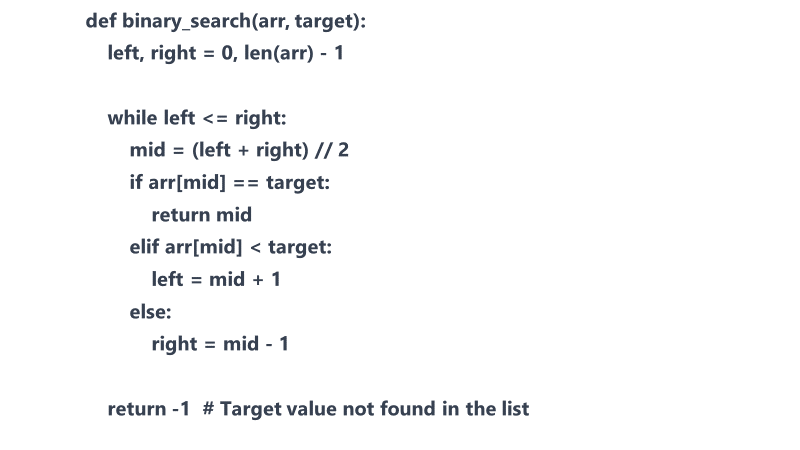
Binary search is a fundamental algorithm in computer science and is used in various applications, such as searching in databases, finding elements in sorted arrays, and more.
Binary search has a time complexity of O(log N), where N is the number of elements in the list. This makes it significantly more efficient than linear search (O(N)) for large datasets, as it reduces the search space by half with each iteration.
 Expertvision